When someone opens https://example.com, the S at the end of HTTPS means the browser does more than simply send a request to the server. First, the two establish a secure connection — only then do pages, passwords, cookies, forms and API requests begin to travel inside it.
This is where terms such as TLS, certificate, private key, certificate authority and encryption appear. They sound serious. But once the process is broken into steps, HTTPS becomes a fairly understandable system.
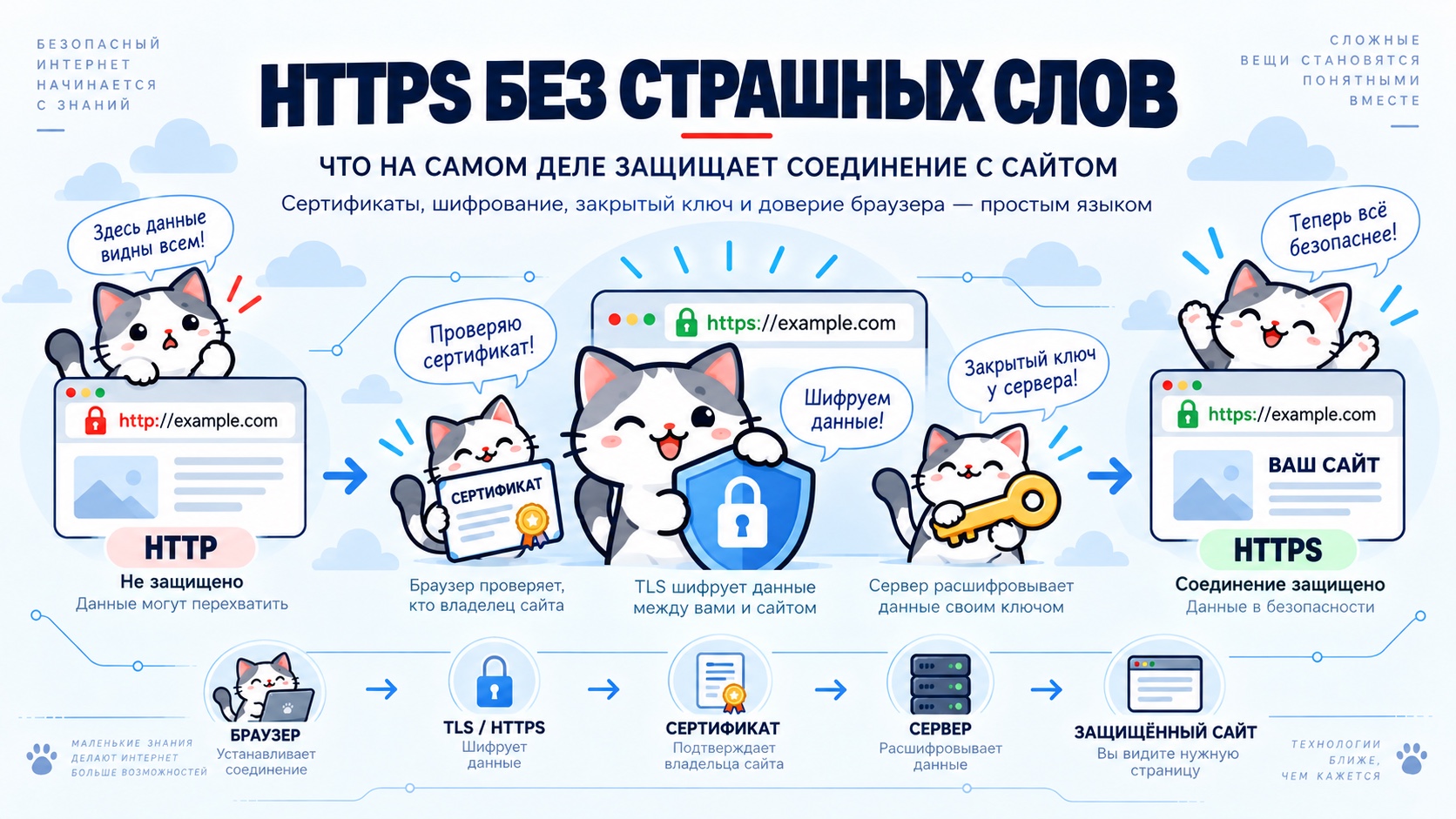
HTTP does not protect data by itself
Ordinary HTTP solves a simple task: the browser sends a request and the server returns a response. For example:
GET /profile HTTP/1.1
Host: example.com
The problem is that HTTP alone does not guarantee protection along the path between browser and server. If someone gains the ability to observe that traffic, its contents could potentially be read or modified.
HTTPS adds a protected layer. It is not an entirely new web protocol: familiar HTTP works inside a TLS connection.
What HTTPS actually provides
HTTPS has three main jobs: encryption, integrity and server authentication. All three matter at the same time.
Where HTTPS sits in our chain
After DNS and Nginx, the request path can be expanded:
DNS has already found the IP. The browser has connected to the server. But before sending an ordinary HTTP request, it establishes a TLS connection. A certificate error is therefore not a DNS error: the previous stage has most likely completed successfully.
Why port 443 is used
Ordinary HTTP normally uses port 80; HTTPS uses 443. So https://example.com usually means a connection to example.com:443.
server {
    listen 443 ssl;
    server_name example.com;
}
But the server now needs more than the site name. HTTPS also requires a certificate and a private key.
What a certificate is
A certificate can be thought of as a digital ID for a site. It lets the browser check which domain it was issued for and which public key is associated with it.
The certificate itself is not secret. The server freely sends it to the browser — that is the point. The secret lives elsewhere.
Public and private keys
The server has a pair of related keys. The public one may be shown. The private one must remain only on the server.
ssl_certificate /etc/letsencrypt/live/example.com/fullchain.pem;
ssl_certificate_key /etc/letsencrypt/live/example.com/privkey.pem;
If the certificate is like an identity document, the private key is closer to a signature that only the real owner can produce.
Why the private key is needed
Imagine someone copied a site’s certificate. That is not enough to successfully impersonate the original server. During secure connection setup, the server must prove that it actually possesses the corresponding private key.
So a convincing certificate alone is not enough: the secret held by the real server is required too.
Who validates a certificate?
If a server simply says “I am example.com, trust me,” that is not strong evidence. This is why trusted Certificate Authorities, or CAs, exist.
Browsers and operating systems contain sets of trusted root authorities. The browser checks the signature chain and decides whether the certificate can be considered valid.
What the browser checks
Seeing a certificate file is not enough. The browser checks whether it matches the domain, whether it has expired, whether it is signed through a trusted chain, and whether the server can prove possession of the matching private key.
If everything is in order, the connection continues. Otherwise, the browser warns the user.
Why certificates do not last forever
Certificates have expiration dates. This is not bureaucratic decoration: if a key was stolen, or a forgotten configuration survives for years without oversight, it should not automatically remain trusted forever.
Modern infrastructure is therefore designed around regular automatic certificate renewal.
What Let's Encrypt does
Let's Encrypt is a certificate authority that made ordinary TLS certificates automated and widely accessible.
The server proves control of the domain, the certificate authority verifies that proof and issues a certificate. Later, the process repeats automatically — for example through Certbot or another ACME client.
How a server proves control of a domain
The certificate authority has to make sure the certificate is not being requested by a random person. One method is to place a temporary special file on the site. The authority requests it through the domain and checks its contents.
Another option is to create a special DNS record. The meaning is the same: demonstrate that the applicant really controls the domain.
Why HTTPS depends on the earlier layers
For automated domain validation to work, DNS already has to point to the right server and that server has to be reachable from the outside. The natural order is:
If several stages are skipped, certificate issuance may fail. That means an HTTPS problem can sometimes begin earlier — with DNS or network reachability.
What happens during a TLS connection
The detailed cryptography of TLS deserves a separate course, but a general picture is enough to understand a website.
The browser and server agree on parameters, the server sends its certificate, the browser verifies it, and the two sides derive secret material for that session. The main traffic is then encrypted with it.
Asymmetric cryptography is useful for establishing trust and exchanging secrets, while fast symmetric algorithms are used for large amounts of data. TLS combines these mechanisms.
There is no single secret for the entire internet
HTTPS does not mean a site has one password for all visitors. Each connection gets its own session parameters. Two people opening the same site at the same time do not have to encrypt traffic with the same key.
That matters because an individual session should not become one permanent secret for the entire site.
What an outside observer can see
HTTPS hides the contents of the connection: form text, cookies, API responses and HTML should not be readable merely because someone is watching the traffic.
But HTTPS does not make the user invisible. IP addresses still exist, packet sizes and timing remain observable, and DNS has its own protection model. HTTPS protects one specific thing — the connection between client and server.
HTTPS does not mean the site itself is trustworthy
This boundary is important. HTTPS does not say that a site owner deserves your money or personal data. It says the connection to a particular domain name is protected.
Why the certificate can be correct while the site is still broken
Because a certificate is only one layer. DNS may work, TLS may connect successfully, the certificate may be valid, while the application behind Nginx returns an error.
If the site shows 500 or 502, reissuing the certificate will usually not help. TLS has already done its job.
Why HTTP can work while HTTPS does not
This is a very useful symptom. If http://example.com opens but https://example.com does not, the basic server is reachable and the problem is in the HTTPS part.
Why redirect HTTP to HTTPS?
Once the secure version is configured, you usually want visitors to always use it. The HTTP block can then do nothing except redirect.
server {
    listen 80;
    server_name example.com;

    return 301 https://example.com$request_uri;
}
HTTP remains an entry point, but normal operation of the site happens through port 443.
What mixed content is
Sometimes the page itself opens over HTTPS while some resources are loaded over HTTP. For example:
<img src="http://example.com/photo.jpg">
<script src="http://example.com/app.js"></script>
This is called mixed content. Browsers treat it strictly and may block some resources. A properly configured site should use HTTPS consistently for both the page and its dependencies.
The certificate has to match the name
If a certificate is issued for example.com but the user opens shop.example.com, that is a different name. It must be included in the certificate.
Certificates can contain multiple names, and wildcard certificates such as *.example.com exist as well. The core rule is simple: the domain in the browser must match the certificate presented by the server.
How Nginx chooses a certificate for a site
Several HTTPS sites can live on one IP. The certificate must be selected before the normal HTTP request fully begins. This is what SNI — Server Name Indication — is for.
That is why one IP can comfortably serve the main site, an API, a shop and other domains with different certificates.
Why the wrong certificate can mean the wrong site was selected
If a server returns a certificate for another domain, it may indicate that Nginx chose the wrong HTTPS block. Common causes are an incorrect server_name, a missing configuration, or the default server.
In that case, the certificate helps diagnose not only TLS but routing inside Nginx as well.
It is better to test HTTPS layer by layer
Instead of trying to reissue everything at once, walk through the system in order:
The earlier the broken section is found, the fewer settings need to be touched. If the domain already points to the right IP, leave DNS alone. If TLS connects, focus on the certificate and Nginx.
Do not disable validation simply because it gets in the way
When the browser warns about a certificate, the easiest path is to ignore the warning. That can be acceptable for a local test, but on a public site the correct approach is to fix the cause.
Wrong domain — fix the domain. Expired certificate — renew it. The server shows somebody else’s certificate — check Nginx. DNS points elsewhere — fix DNS.
Good HTTPS is almost invisible
For an ordinary visitor, properly configured HTTPS is boring. The site simply opens. No warnings, manual confirmations or noticeable delays. Certificates renew automatically, Nginx uses the right files, and HTTP redirects to HTTPS.
That is the ideal state: infrastructure security works best when the user barely has to think about it.
The website chain is now almost complete
We can now assemble the full path of a single page load:
The user enters an address. DNS finds the IP. The browser connects to 443. TLS begins, the server presents a certificate, the browser verifies it, and a protected channel is created. Only then is the HTTP request sent inside that channel. Nginx chooses the site and returns the page.
HTTPS should not be magic
Serious cryptography sits underneath HTTPS, but a site owner does not need to begin with formulas. It is more useful to understand the roles first.