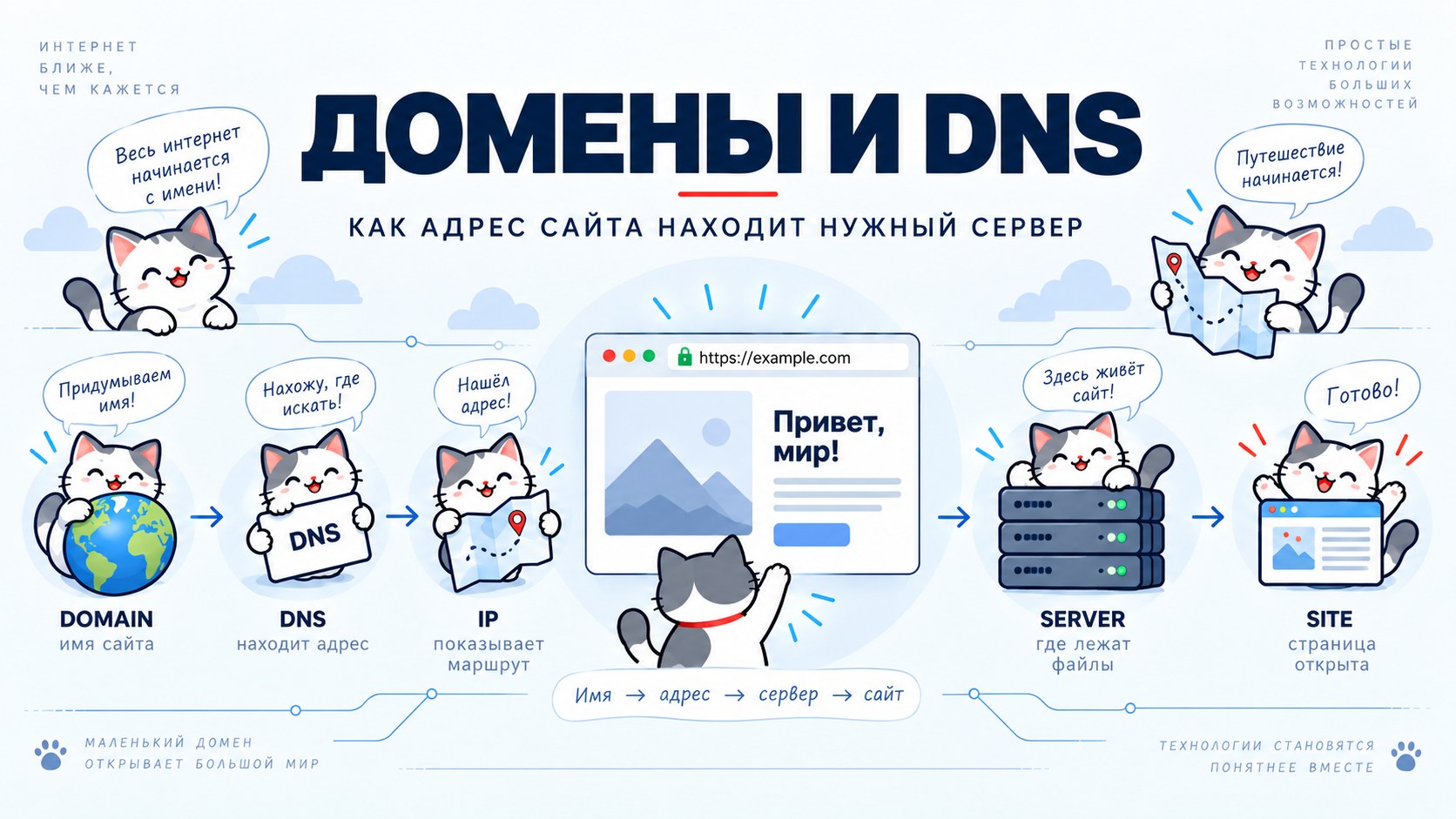
When someone enters a website address in a browser, the browser does not yet know where that site is. It knows only the letters of the domain name. To open the page, that name has to be connected to a specific server on the internet. DNS does that work.
From the outside, the whole process looks almost instant. But in a fraction of a second the browser, operating system and DNS servers can pass through a chain of requests, find the required IP address and only then contact the web server. Understanding this chain is especially useful when moving a site, changing servers, or diagnosing a case where the IP works but the domain does not.
A domain is a name, not a place
A domain is useful to think of as a name in an address book. It lets a person remember a readable name instead of a string of IP-address numbers.
But the domain itself does not contain web pages and is not a server. Registering a domain name only means its owner has the right to manage that name within a particular domain zone.
Where the site actually lives is defined separately. A domain has DNS records for this. They tell the rest of the internet where to go when someone wants to open the site, send mail to it or use another service.
What happens after you enter an address
Imagine someone types https://example.com into a browser. The first thing the browser needs is the server’s IP address. Without it, a connection cannot be established.
Before sending a query onto the internet, the computer usually checks whether it already knows the answer. DNS data can be cached by the browser, operating system, home router or the ISP’s DNS server.
If there is no ready answer, the lookup begins. The query gradually reaches the DNS system, which knows which servers are responsible for the relevant domain zone and where the authoritative DNS servers for the specific domain are. Eventually, a record containing the server address is returned.
DNS then steps aside for a while. The browser now knows the IP and can start a normal connection to the server: establish an HTTPS session, send an HTTP request and receive the page.
This short chain explains a large part of what happens whenever any website is opened.
Who stores the correct answer?
DNS does not have one worldwide table containing the addresses of every website. The system is distributed.
Different servers are responsible for different parts of the namespace. At the end of the chain are authoritative DNS servers — the source of data for a specific domain.
Their addresses are specified through NS records. If DNS is managed by the registrar or a separate DNS provider, those servers usually become authoritative and store the records created by the owner.
The main DNS record types
For an ordinary website, only a few types of records are usually involved.
An A record links a name to an IPv4 address. For example: example.com → 203.0.113.10. When a user opens example.com, DNS returns that address and the browser goes to the required server.
IPv6 has an equivalent AAAA record.
CNAME works a little differently. It says that one name is an alias of another. For example: www.example.com → example.com. In this case, www.example.com does not need to store its own IP separately: DNS first discovers which name the CNAME points to, then resolves that name’s address.
There are other records too: MX for mail, TXT for text data and service verification, and several more specialized types.
Why DNS changes are not visible immediately
One of DNS’s most frustrating traits becomes obvious during a site move. The record has been changed, the control panel shows the new IP, one computer opens the new server — while another still sees the old one.
Most of the time this is not an error. DNS relies heavily on caching. If every browser had to repeat the full lookup chain every time a page opened, the system would be much slower and generate enormous unnecessary load.
So a received answer is stored for a while. The storage time is defined by TTL — Time To Live.
If a DNS server receives a record with a TTL of 3600 seconds, it may use that cached answer for up to an hour without asking the authoritative server again.
That is why, after a change, two answers can coexist on the internet for a while and both can be valid from the point of view of their caches: the old one and the new one.
What “DNS propagation” really means
People often say that after a record changes, you have to wait for DNS to “propagate across the internet.” It is a convenient phrase, but the technical picture is a little different.
The new record does not travel from server to server, gradually taking over the internet. An authoritative DNS server may begin returning the new answer almost immediately after the change.
The issue is that many intermediate DNS servers still hold the old answer in their caches and are allowed to use it until the TTL expires.
As those timers run out, servers query again and begin receiving the new value. What looks like propagation of a new record is largely the gradual disappearance of old cached answers.
Why a site can work by IP but not by domain
This situation is especially useful for diagnostics. If the server is reachable directly by IP, then the machine can at least be reached over the network.
But if the domain still fails, the problem can be at another layer: DNS returns an old address, the wrong record is in use, the cache has not refreshed yet, or the web server is not configured to serve requests for that domain name.
So a successful response by IP does not prove the whole site is configured correctly. And the reverse is true too: a correct DNS record does not guarantee the page works. It only brings the user to the right server. After that, the web server, HTTPS and the site itself still have to work correctly.
DNS and HTTPS are related, but they are different things
These systems are sometimes treated as one because problems with both often appear during a site launch.
Their jobs are different. DNS helps the browser find the server. HTTPS then helps establish a protected connection and verify that the server is allowed to serve the requested domain.
That is why DNS may already point to the new server while the browser still shows a certificate error. At that point, changing DNS again usually fixes nothing: the request is already arriving where it should.
Check the certificate and web-server configuration instead. Separating the system into layers is one of the easiest ways to diagnose network problems.
How to move a site to another server safely
Suppose the site already works on an old server and needs to move to a new one.
The riskiest approach is to change DNS first and only then begin configuring the new machine. At that moment, some users may already reach a server that is not ready.
A safer order is the reverse. First, fully prepare the new version of the site on the new server. Check the files, web server, HTTPS and required routes. Ideally, verify that the site works correctly on the new IP before changing the public DNS record.
Only then switch the domain to the new address. It is best not to turn off the old server immediately. Because of DNS caches, some visitors may still arrive there.
Once it is clear that the old IP is barely being used and cached records have expired, the previous server can be retired.
TTL is useful to plan in advance
If you know a large site will move in a few days, you can lower the TTL ahead of time.
For example, a record that is normally cached for several hours can temporarily be configured for a shorter period. Then you wait until the old, longer TTL has aged out.
After that, the future IP change will be noticed by DNS servers much faster. Once the migration is complete and stable, the TTL can be returned to a normal value.
For a small site, this preparation is not always necessary. But the principle shows an important DNS property: switching speed depends not only on when a record is changed, but also on what data is already sitting in caches.
How to check DNS without guessing
When a domain has problems, do not rely only on what one browser shows.
The browser, computer, router and ISP may all have their own caches. The same page can therefore behave differently on two devices at the same moment.
A better approach is to compare several levels. First, check what the authoritative DNS server contains. Then see what independent public DNS resolvers return. Finally, check which IP the connection is actually using.
If the authoritative servers already return the new address while one device still receives the old one, the cause is almost certainly caching rather than a need to edit the DNS zone again.
Do not change several layers at once
DNS rarely exists on its own. Next to it are the web server, certificates, firewall, IP addresses and site files.
That creates a temptation to change everything at the first sign of trouble: the A record, Nginx configuration, certificate and server settings.
Even if such a repair works, it explains very little afterward because nobody knows which change actually helped.
It is much more reliable to follow the request path in order:
If DNS returns the correct IP, consider that stage checked and move on. If the HTTPS connection succeeds, there is no reason to go back and change DNS again. Every successful check narrows the search area.
The old server is not always to blame
After a migration, there is a convincing illusion: the user sees the old page and concludes that the new server is somehow still serving old files.
But the request may not be reaching the new server at all. If the device is using a cached DNS record, it is still connecting to the old IP. Changing files on the new server will do nothing in that situation.
So when an unexpectedly old page appears, first determine which IP the request actually reached. This simple question often saves a lot of unnecessary work.
DNS should be boring
Well-configured DNS rarely reminds you that it exists.
Records change infrequently, the structure is clear, obsolete values do not accumulate for years, and the owner knows where the authoritative servers are and which IP a visitor should receive.
That is the state worth aiming for. DNS does not need to be mysterious magic between the domain and the site. At the core, the process is orderly: a name receives an address, the browser goes to that address, and the remaining systems handle the connection and page.
Once this boundary is clear, server migrations and troubleshooting become much calmer.
What comes next
Once the domain has brought the browser to the correct server, the next stage begins: the request has to be accepted by the web server.
It decides which site to show, where its files live, what to do with HTTP and HTTPS, and how to serve several domains on one machine.